
A client who was not reminded does not always show up. Each no-show costs a specialist an hour of work, so reminders in BeeSection work from day one without any setup. This article explains what exactly happens and what you can change.
Where it is in the CRM
- Reminder hours and channels: Settings → Salon → Reminders.
- The log for a booking: in the booking card.
- SMS provider: Settings → Integrations.
When a reminder goes out
By default there are two reminders: 24 hours before the visit and 2 hours before. The first gives time to reschedule, the second catches those who forgot about today.
You can change the set in the reminder settings: one or several reminders, each from 1 to 168 hours before the visit. A salon with long procedures adds a 48-hour reminder; a barbershop often keeps only the 2-hour one.
The reminder asks the client to confirm the visit: an "I will come" button on the booking page and under the Telegram message. Those who haven't answered are listed on the dashboard under "Not confirmed for tomorrow". Details in "I will come": clients confirm the visit themselves.
If fewer than 15 minutes remain before the visit, no reminder is sent: the client is already on the way. If a booking is created after the time of the first reminder has passed, that one is skipped and the next goes out as usual.
Separately from reminders, a client who books through the site gets a confirmation right away. Without it they do not know whether the booking exists at all and call the salon to check.
Reminders are not sent for bookings with the statuses "cancelled", "completed" and "no-show". Mark no-shows with the status rather than deleting the booking: the history stays, and the client card shows how many times the person did not come.
Two channels that work immediately
A new salon has connected nothing, yet it already has reminders. Two channels:
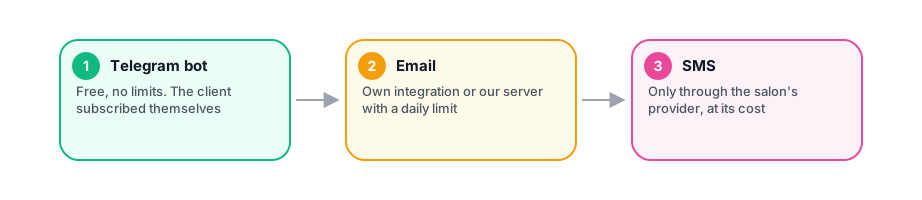
The BeeSection Telegram bot. Free and unlimited. The client subscribes on their own: the "my booking" page has a "Remind me in Telegram" button. Pressing it opens the bot, and the client sees your salon's name in the message. You cannot subscribe a client on their behalf, and that is right: otherwise it would be messaging without consent.
Email. If the client is not subscribed to the bot, the reminder goes to their email address. Our mail server sends these letters, and there is a daily limit that depends on the plan:
| Plan | Emails per day |
|---|---|
| Solo | 30 |
| Start | 100 |
| Salon | 300 |
| Network | 1000 |
For a solo specialist 30 emails a day is plenty. A salon with eight specialists hits the Start limit, which is exactly why Salon has a bigger one. When the limit is used up, the owner gets an email about it, once a day.
If the salon has its own email integration, letters go through it and the BeeSection daily limit is not used.
Channel order
A reminder goes through the first channel that succeeds. The order is a list in the settings, and by default it is: the Telegram bot, then email. A client subscribed to the bot gets no email; one who is not gets the letter.
Available channels: the platform Telegram bot, the salon's own Telegram bot, Viber, WhatsApp, SMS and email. Everything except the platform bot and email requires an integration on the salon side.
SMS: through your own provider
We do not send or sell SMS. The salon connects a provider and pays them directly. The integration catalogue includes Zadarma, TurboSMS, Kyivstar, Twilio and eSputnik. A message costs from about two hryvnias, and pricing someone else's traffic into the subscription would mean either overcharging everyone or losing money on the first active salon.
After connecting a provider, add sms to the end of the channel list. Free channels then go first, and paid SMS reach only those who cannot be reached any other way.
Why a reminder was not sent
Every reminder, sent or skipped, is written to a log. A skip has a reason, and it is visible in the booking's reminder log:
- No contact. The client is not subscribed to the bot, and the card has neither an email nor a phone number.
- Client unsubscribed. The person opted out of reminders.
- Daily email limit of the plan reached. The salon has sent everything the plan allows for today. The limit resets tomorrow.
- Daily platform email quota reached. This is about our mail server, not your plan. We see such cases and fix them ourselves.
The system cannot skip a reminder silently: you would decide reminders are broken and look for a problem where there is none.
What about clients without Telegram or email
Ask for a phone number and connect SMS, or ask clients to subscribe to the bot at their first visit. The subscribe button is on every booking page, so sending the client a link to their booking is enough.
A client who sends /stop to the bot unsubscribes from all salons at once. A person is opting out of reminders, not out of one specialist, and is not obliged to remember how many salons there were.


Comments
No comments yet. Ask your question — we answer within a day.