
A salon does not close only for weekends. Renovation, a move, the New Year week, a power cut for a day. For such cases there is a closure for a period. It is different from a specialist's schedule, and the two should not be confused.
Where it is in the CRM
- Closures: Settings → Salon → Salon closures.
- Specialist absences: Employees → card → Schedule.
Two different things
A specialist's vacation or day off belongs to the specialist. They are away, the rest of the team works, and clients book with others. This is set in that specialist's schedule as an exception for a date.
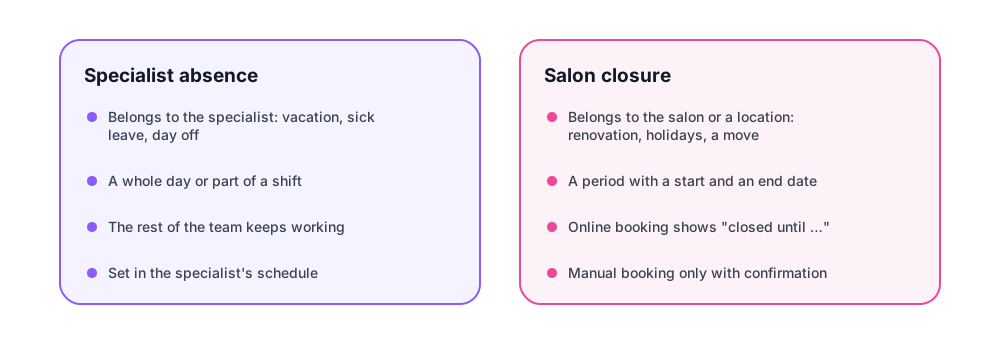
A salon closure belongs to the salon or a location. On those days nobody works, and bookings must not come to anyone. This is set in the company settings, in the "Closures" section.
If you close by giving every specialist a vacation, you spend time and forget the administrator, who also has a schedule. A closure does it in one record.
How to create a closure
In the closures section you set:
- a start date and an end date, both inclusive;
- the whole company or one location;
- a reason: renovation, holidays, a move. The team sees it, and six months later nobody wonders why the calendar has an empty week.
One record is one period. For the New Year holidays that is a single record from 31 December to 7 January, not seven separate ones.
What the client sees
On the booking page there is no free time on closed days. Instead of an empty calendar the client sees an explanation: the salon is closed until such a date, and the nearest open day. The person picks another day right away instead of closing the page thinking booking is broken.
Bookings already sitting on the closed dates stay as they are, and their reminders keep going out. Move or cancel them by hand: the system does not cancel other people's agreements for you.
A manual booking on a closed day
An administrator can create a booking on a closed day. Sometimes it is needed: the owner agreed with a regular to come in during the renovation because one room still works. The system asks you to confirm that you know the salon is closed that day, and after confirmation the booking is created.
Online booking has no such confirmation: a client from the street cannot book a closed day under any circumstances.
When the closure ends
Nothing needs to be done. The day after the end date the booking page shows free time again. If the renovation drags on, extend the end date in the same record rather than creating a new one: the history of closures stays readable.


Comments
No comments yet. Ask your question — we answer within a day.