
Inventory is not there to tell you how much shampoo you have. It is there to show where the hair colour goes and to keep expired products off the shelf. The inventory module is available on the Salon plan and above.
Where it is in the CRM
- Receipts, lots, transfers, stock counts: the Warehouse section.
- Products, categories, brands, suppliers: Settings → Catalog.
What the records consist of
The order is brand → category → product. A product is a specific item with an SKU, such as "Shampoo Pro 1000 ml". Then movements happen to it: receipts, write-offs, transfers, stock counts.
Stock sits in warehouse bins and in lots. Each product in a warehouse has two numbers: quantity and available quantity. The difference is the reserve: goods set aside for a specific need but not yet written off. The available quantity is calculated automatically and is never edited by hand.
Receiving a delivery
A receipt takes three steps:
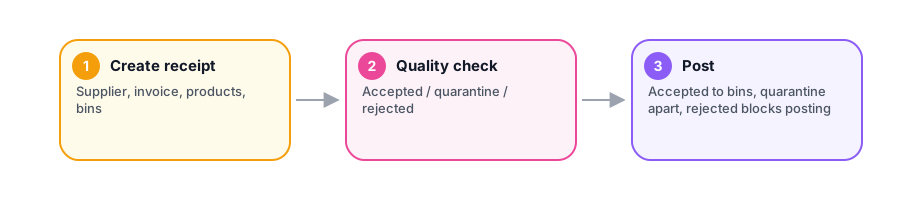
- Create the receipt. Supplier, invoice, a list of products with quantities, purchase prices and the bin they go to.
- Quality control. You mark every item: accepted, quarantine or rejected. The receipt cannot be posted without this step, and that is deliberate: goods nobody checked turn up later as a surprise.
- Post the receipt. Accepted items land in their bins. Quarantined items go to a separate "Quarantine" bin and are moved out after the matter is settled with the supplier.
A receipt with rejected items cannot be posted at all. Remove them from the document or move them to quarantine, and raise the claim with the supplier separately.
Lots and expiry dates
If a product has an expiry date, the receipt creates a lot: how much arrived, when, and until what date it is good. Then there are two lists worth checking once a week: lots that are about to expire and lots that already have. Expired stock is disposed of with a separate action, visible in the history.
Write-offs come from lots according to a strategy set per product per warehouse:
- FIFO - what arrived first is written off first. The default.
- FEFO - what expires first is written off first. For cosmetics and colour with expiry dates this is the main rule, and it is worth setting deliberately.
- LIFO - what arrived last is written off first. A rare case, such as goods stacked on top of each other.
In practice it means one thing: when colour is written off, the system decides which lot it comes from, and that lot's balance goes down.
Transfers between warehouses
A salon with two locations or a separate retail warehouse moves goods with a document: create → ship → receive. After shipping, the goods are off the first warehouse but not yet on the second: they are "in transit", and that is visible. Receiving is done by whoever got the goods, and that is when the balance appears in the second warehouse. A transfer in transit can be cancelled; the goods then return to the sender.
Stock count
Once a month or before a report:

- Create a stock count for a warehouse.
- Add all warehouse products. The system fills in the book balances.
- Start. From this moment, avoid movements in that warehouse.
- Enter actual quantities. Counted on the shelf, written down.
- Complete. The system compares the books with the facts.
A shortage is written off from the lot and bin where it was found. A surplus is received into the same place. A difference within a thousandth of a unit is ignored.
The difference between books and facts is visible per product. That is the answer to "where does the colour go": not in general, but by item and by date.
Write-offs during a visit
Materials are written off when a visit is completed: by the consumption norms set for the service, or by items added to the visit by hand. The write-off comes from the warehouse of the location where the visit took place, from real bins and lots according to the product's strategy.
Nothing is reserved in advance at the moment of booking. A reserve is a separate action: you set goods aside for a specific need by hand, and the available quantity drops immediately. Forgotten reserves are released by the system after a set time.
Comments
No comments yet. Ask your question — we answer within a day.